Practical guide
Alors On Danse AI Generator: Two-Photo Meme Guide
Create the Alors On Danse AI studio meme with two portraits. Check keyboard-left and laptop-right photo order, source audio, 7–15 seconds and credits.
In this guide
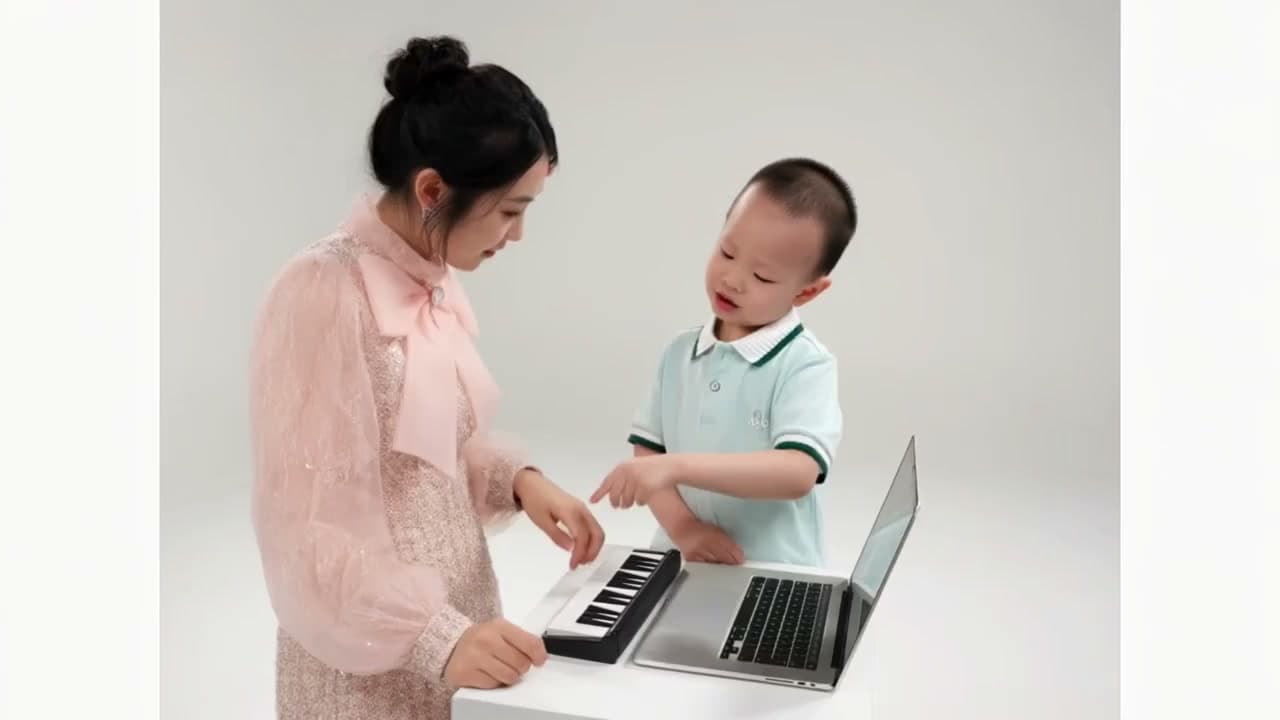
The Alors On Danse AI meme is a white-studio making-of scene: two people stand at a MIDI keyboard and laptop as if they made the track. For a TikTok creator, the repeatable format is the unexpected duo plus a new situation in every episode. Upload two separate human portraits. Photo 1 replaces the left keyboard performer and photo 2 replaces the right performer beside the laptop. The template supplies the studio, camera movement, performance and the original source audio.
Start with the right Alors On Danse AI meme
This generator is for the keyboard-and-laptop making-of scene, not the separate dance challenge. It needs two portraits and paid credits; this template does not support the free generation preview. For an opening line that fits the scene, try these 10 Alors On Danse studio-duo captions.
Is this the version I mean?
Use this guide when the visual is the two-person music-making scene. “Making of” describes the joke that the characters appear to have made the track; it does not claim to document how the original recording was produced. This is different from the earlier dance challenge format because the characters are performing the music-making action.
Creator format brief
- Viewer trigger: Two familiar people appear in a scene where viewers would not expect them to make music together.
- Series promise: Each episode casts a new duo into the same studio and gives that pairing a fresh, recognisable situation.
- Opening line:
When [two roles] have to make [one familiar situation] work. - Cover rule: Keep both faces, the keyboard and the laptop visible; use the situation as short cover text.
- Comment prompt:
Who should be the next unlikely studio duo? - Next episode: Turn the clearest suggested pairing into the next post, then change the situation rather than repeating the same joke.
What you need
- Two separate, clear human portraits, one person per image.
- Permission to make and publish both likeness edits.
- Deliberate upload order: photo 1 is the left keyboard performer; photo 2 is the right performer beside the laptop.
The template is verified for two human portraits. Pet, toy and game-character replacement are not verified for this workflow. Do not upload a group photo or a background image as a substitute for either identity slot.
How to make the video
- Open the Alors On Danse AI template and confirm the live labels.
- Upload the left performer first and the right performer second. Check that each person has consented to the likeness edit.
- Choose 7–15 seconds in one-second steps. The verified contract is 20 credits per second: 7 seconds is 140 credits, the 10-second default is 200, and 15 seconds is 300.
- Sign in, confirm the displayed charge and generate. Review the complete result with sound before downloading or posting.
The prepared source is 16:9 at 720p and the template is marked without a watermark. Generation time varies with the provider queue; the listed ten-minute estimate is planning guidance, not a delivery guarantee.
Use each post to operate a TikTok series
Keep the scene stable and vary the reason viewers should watch this episode. Safe premises include a parent-and-child duo trying to solve one small problem, two friends with opposite approaches to a task, or two fictional roles who would never normally share a studio. Put the premise in the first on-screen line, let the familiar studio provide the visual payoff, then ask for the next pairing in the caption.
After posting, separate comments that simply react from comments that suggest a duo or situation. The suggestions are the next-episode backlog. A consistent scene and a changing premise create a testable account format; they do not guarantee views, follows or ranking.
Audio, consent and publishing checks
The delivered video must retain the original audio from the same selected source segment. Model-generated audio must not replace it, and the user should not be told to add a substitute track to finish the template. Check the two faces, role order, keyboard interaction and source audio at normal speed. Follow TikTok’s AI-content disclosure rules and use only likenesses you are authorised to publish.
Plan an Alors On Danse AI music video
The Alors On Danse AI template works best when each person has a recognisable job in the joke. In this two-person keyboard meme, one person appears to make the music while the other stands beside the laptop. A caption about an unlikely creative partnership can explain the pairing before viewers need to recognise the song.
The Alors On Danse photo order follows the screen: keyboard on the left first, laptop-side performer second. For a keyboard and laptop AI video, use separate portraits and check those labels before submitting. The prepared performance supplies the music and movement; uploading a portrait does not record that person's voice.
Frequently asked questions
How many photos do I need?
Two separate human portraits are required. Photo 1 maps to the left keyboard performer and photo 2 maps to the right performer beside the laptop.
Can I use one photo twice or a pet photo?
That workflow is not verified. Use two distinct human portraits for the current contract.
Does the video keep the original sound?
Yes. The finished file is required to retain the original source audio from the selected segment.
Can this build a TikTok account?
It can support a recurring duo format when every post has a new premise and a clear comment question. No template guarantees traffic or followers.
The matching action is the Alors On Danse AI template, where the current duration, credit total and input labels are authoritative.
Practical questions before you create
These answers cover the current AI Video Swap workflow. They are written around likely customer questions, not a measured ChatGPT popularity ranking.
Choosing this scene
What is the Alors On Danse AI video trend?
This page covers the keyboard and laptop performance scene. This generated example shows a woman at the keyboard on the left and a child beside the laptop on the right, with the original studio action and sound. It is the operator-approved two-portrait result from this template. The prepared scene is the reference for this template, rather than a promise to reproduce any video found under the same trend name.
How do I make a Alors On Danse video from photos?
Open the Alors On Danse template, watch the preview, sign in and prepare the requested images. Upload two clear, well-lit human portraits, with one person in each image: photo 1 replaces the left keyboard performer and photo 2 the right performer beside the laptop. Review the displayed quote and confirm once.
Is Alors On Danse a face swap or a new video from a text prompt?
It is a prepared-scene workflow: your images guide the replacement within the keyboard and laptop performance. It is not an unrestricted text-to-video brief. A caption describing a different setting does not change the template scene.
Can ChatGPT generate my Alors On Danse template video for me?
You can ask ChatGPT to help plan a caption, compare inputs or explain a scene. That conversation does not submit a job on AI Video Swap, reserve credits or create a result in your account. Complete those actions on the template page.
Preparing the right inputs
Can an Alors On Danse AI generator use two separate portraits?
Yes. Two separate human portraits are required. Upload two clear, well-lit human portraits, with one person in each image: photo 1 replaces the left keyboard performer and photo 2 the right performer beside the laptop.
Which photo goes on the keyboard and which goes beside the laptop?
Upload two clear, well-lit human portraits, with one person in each image: photo 1 replaces the left keyboard performer and photo 2 the right performer beside the laptop. Compare the labelled upload slots with the preview before proceeding. Do not infer an extra replaceable role just because somebody else appears in the background.
What makes a good reference photo for Alors On Danse?
Use even lighting and a recognisable, unobstructed face. For this scene, follow the specific framing requirement: Upload two clear, well-lit human portraits, with one person in each image: photo 1 replaces the left keyboard performer and photo 2 the right performer beside the laptop. Avoid improving a blurry reference by adding a strong beauty filter; that can remove useful identity detail.
Can I use a group selfie for Alors On Danse?
Use separate, clearly identified photo inputs rather than relying on the tool to choose one face from a crowded image. Crop only when it preserves the required face and body framing; if the intended person is too small, take another photograph.
Understanding the output
Do I need to film the Alors On Danse dance or performance?
No source performance upload is needed for this prepared template. The keyboard and laptop performance is already supplied. Your task is to provide the correct photos, check the chosen option and review the generated result.
Can I change the background or choreography in Alors On Danse?
The keyboard and laptop performance and its action define this template. It is not a menu of arbitrary choreography or locations. Choose another scene for a different visual idea; a different photo alone is not a reliable way to request a new script.
Will both faces and outfits stay consistent in my Alors On Danse AI video?
Exact clothing, accessories and likeness are not guaranteed. Inspect left keyboard player and right laptop-side performer. A clear reference can help the model, but it does not turn the result into a pixel-for-pixel reproduction of your photo.
Can I use a pet instead of a person in Alors On Danse?
This is a human-photo template; a pet workflow is not claimed. A popular animal dance seen on TikTok does not establish pet support in this form. Use an explicitly supported workflow rather than spending credits on a mismatched input.
Cost, trial and account
How long is a Alors On Danse video?
The current listed range is 7–15 seconds, subject to the selected option. The public sample and the chosen output option can have different lengths, so use the form’s selected duration for the purchase decision. Do not substitute a duration from another website’s tutorial.
How many credits does Alors On Danse cost?
The current contract uses 20 credits per second; 7 seconds is 140 credits. The confirmation shown immediately before Generate is the amount to check. Site credits are not US dollars, and another provider’s unit price is not the price of this template.
Can I try Alors On Danse for free?
This template does not offer the free preview. Eligible customers who have not made their first successful purchase can check the marked trial templates; the allowance is once across the site, not once per template.
Why does Alors On Danse ask me to sign in before uploading?
Browsing the keyboard and laptop performance preview is public. Uploading and generation require a signed-in account so the job and any credit charge can be associated with you. Use the same account to find the result later.
Generation and delivery
What happens if I do not have enough credits for Alors On Danse?
Use the upgrade or Pricing link from your chosen scene and compare the plan’s credits with the displayed job total. Return to the intended template after checkout, verify the balance and photo slots, then confirm generation. Buying a plan is not itself a video submission.
How long does a paid Alors On Danse AI video take to generate?
Video generation is asynchronous. Check the existing job in My videos and distinguish queued, running, failed and succeeded states. Slow output is not a reason to repeatedly press Generate; first establish whether a job was already accepted.
Where can I watch or download my Alors On Danse result?
Open My videos in the same account, select the job and use its result controls when it succeeds. Download a copy while it remains available; the video area is a temporary delivery surface, not a permanent media archive.
What should I check before sharing a Alors On Danse result?
Watch the whole clip at normal speed, then pause around left keyboard player and right laptop-side performer. Check the first and last frames, framing and audio too. A good cover image alone does not establish that every frame is suitable to share.
Reviewing and sharing
What should I do if Alors On Danse fails or the result looks wrong?
Record the job ID and displayed status. A terminal failure and an unattractive successful result are different issues. Check the credit transaction history before resubmitting; ask support about an unresolved charge rather than assuming a quality complaint creates an automatic refund.
What caption could I use for a Alors On Danse TikTok?
Try the premise “when the quiet friend takes over the playlist”. Make the opening text understandable before the action peaks. Place it away from the face and the app controls, then preview on a phone. Treat this as a creative suggestion, not a proven viral caption.
Can I post my Alors On Danse video to TikTok, Shorts or Reels?
Check the framing, export and platform rules first. A video file containing music is not evidence of a music licence for every platform, region or advertisement. Obtain the permissions you need and avoid presenting an AI scene as documentary footage.
Is Alors On Danse guaranteed to be trending or get views?
No. Search interest, a recognisable scene and a completed generation do not guarantee reach. Compare your own posts using retention, qualified visits and conversions. The questions in this guide are editorial predictions of customer needs, not access to private ChatGPT search statistics.
A small story to try: One person plays, the other supervises
The scene gives you a keyboard performer and a partner beside a laptop. Give that existing action a reason to happen before asking for another render: a recognisable everyday situation often needs less explanation than a generic “viral AI video” caption. Keep the premise consistent with the actual preview and leave the face and important movement unobstructed.
For a more useful ChatGPT planning conversation, try these specific requests:
- “Write three Alors On Danse captions about the friend who insists they are the producer.”
- “Explain the two-photo order: keyboard on the left, laptop-side performer on the right.”
- “Make a review checklist for both identities, keyboard contact and the original scene rhythm.”
These are suggested customer planning prompts, not measured ChatGPT searches or extra controls in the template. Use the first to develop the joke, the second to prepare the inputs and the third to review the result before sharing. A caption edit can improve an unclear premise without paying to generate the same scene again.
From your photo to a scene