THE MOMENT, EXPLAINED
Bicep Heart Trend: Meaning, Photo Tips & How to Make the AI Video
What is a bicep heart? Learn the flex-and-heart gesture, choose a better reference photo and turn the moment into a short AI video with original sound.
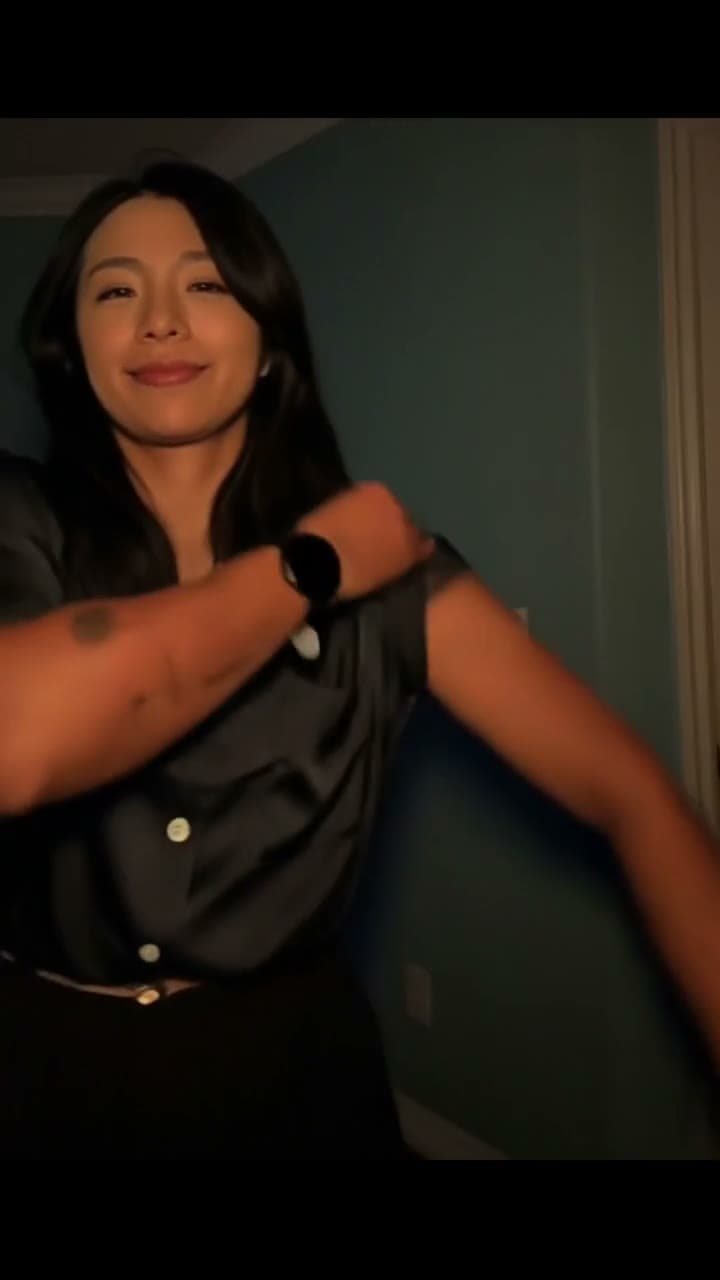
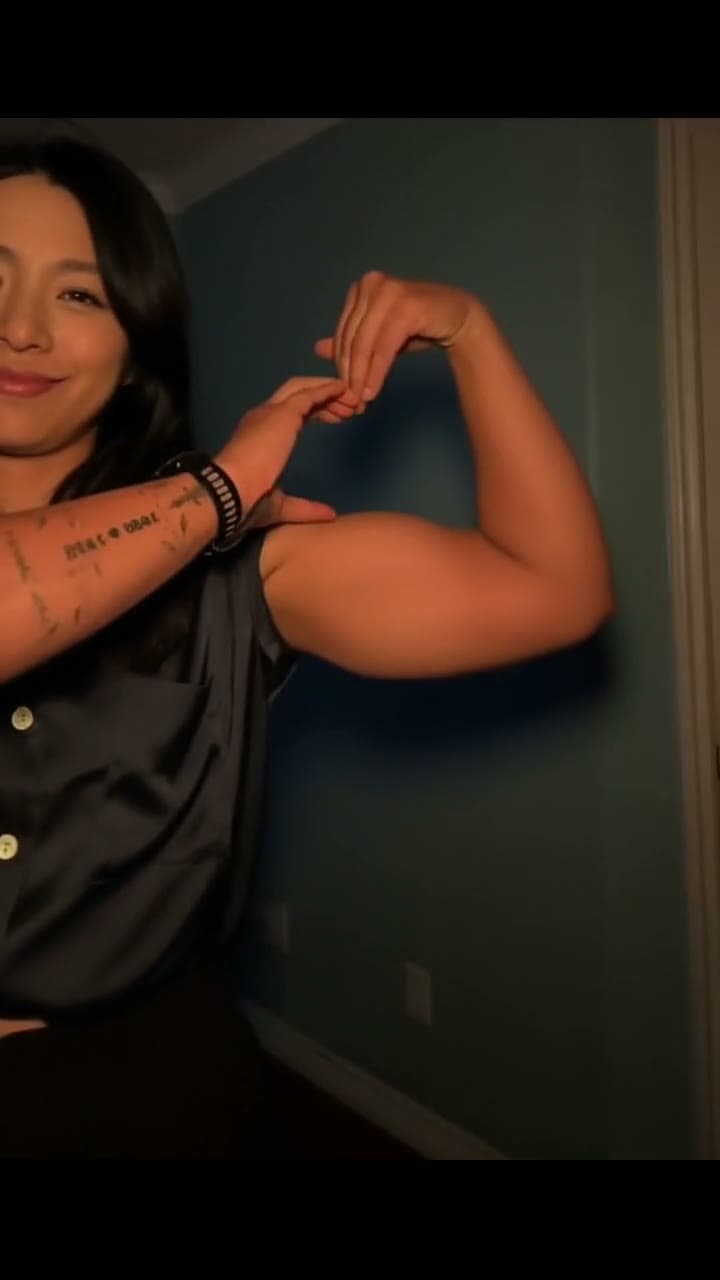
Want the moving version?
One adult photo, a 7-second scene and the original soundtrack. Watch the example and check the total before you decide.
See the Bicep Heart template →In this guide
- What is a bicep heart?
- I found a heart bicep pic. Can I make it move?
- How do I make a bicep heart video from one photo?
- Which photo gives me a better first try?
- How much does it cost, and will I get the music?
- What should I ask ChatGPT or Codex before choosing an AI video tool?
- Buying an AI Bicep Heart video: questions worth asking
- Five captions that fit the reveal
- Is the bicep heart trend still rising?
- Ready to choose your photo?
The joke lands in two beats: a confident flex, then a heart. Bicep Heart turns a show of strength into a small, affectionate gesture. It works as a gym joke, a playful message to someone you like or a birthday clip that says more than another sticker.
If you want the moving version with your own face, watch the Bicep Heart AI video example. The prepared scene provides the movement and soundtrack; one adult photo provides the appearance. You do not have to learn the pose or record yourself.
What is a bicep heart?
A bicep heart is a heart gesture made alongside a flexed arm. The contrast is the appeal: strong-arm confidence becomes a surprisingly sweet message. People use both bicep heart and biceps heart for versions of the trend; the exact hand placement can differ between clips.
Searching “bicep heart meaning” or asking “what’s a bicep heart?” usually leads to that visual joke. It does not have one fixed romantic meaning. A caption can make it flirtatious, friendly or completely tongue-in-cheek.
This template follows the seven-second performance shown in the example. It is a specific scene, so watch the full gesture before choosing it. It is not a general editor for every version of the bicep challenge.
I found a heart bicep pic. Can I make it move?
“Heart bicep pic” and “bicep heart photo” describe the still-image side of the idea. A video adds a reveal: viewers see the flex before the heart appears. That is useful when the punchline depends on timing.
For this template, choose a normal, clear photo of the person you want in the scene. You do not need a photograph of them already doing the gesture. The source performance supplies the pose and timing, while your photo guides the face, hair and visible outfit.
A face-only selfie can identify a person but says little about their clothing. An upper-body photograph with visible shoulders and a clear outfit gives the model more useful information. The example is an AI-generated result, not a guarantee that every photo will produce the same hands or fabric details.
How do I make a bicep heart video from one photo?
- Watch the example with sound. Check that this is the flex-and-heart performance you want.
- Choose one adult photo. Keep the face unobstructed, the shoulders visible and the outfit well lit.
- Review the complete-video price. The complete video costs 200 site credits for seven seconds, with the scene’s original soundtrack.
- Confirm permission before generating. The finished result belongs in your private My videos area; download it within seven days.
- Check before sharing. Watch the face, fingers, sleeves and final heart shape. Listen to the audio, then add a short caption if you want one.
The template controls the generation instructions, so you do not have to paste a technical prompt. It does not offer custom choreography, a different song or voice cloning. If you want a different kind of performance, browse the template library before spending credits.
Which photo gives me a better first try?
Choose a photograph you can inspect easily on a phone screen. If you have to zoom in to identify the face, find a closer image.
- Use one adult, facing forward or slightly to the side.
- Keep the face, hair, shoulders and upper-body outfit visible.
- Prefer even light over deep shadows and strong beauty filters.
- Avoid group photographs, sunglasses that obscure the eyes and large props across the torso.
- Upload JPEG, PNG or WebP, up to 10 MB and at least 300 × 300 pixels. Convert iPhone HEIC photos to JPEG first.
The model aims to carry the visible outfit into the scene, but it may alter fingers, fabric patterns, body proportions or markings. Do not choose this effect expecting precise tattoo reproduction or a frame-perfect product demonstration. A clearer reference reduces ambiguity; it does not make the result certain.
How much does it cost, and will I get the music?
Bicep Heart uses a 200-credit total for one seven-second video, including the fixed scene and its original soundtrack.
For context, the current Acquisition plan is US$4.99 per month for 499 credits. At 200 credits per video, that covers two Bicep Heart videos with 99 credits left. It is a recurring subscription, not a one-time US$4.99 video purchase. Cancel future renewals in your account; credits do not expire. See the current plans before deciding.
This template has no free Bicep Heart render. The example is free to watch. A failed paid job returns its site credits; a successfully completed video whose creative details you dislike is a different situation. Check the task status before sending another request.
The soundtrack comes from the prepared scene. It is restored after the picture is generated and checked before delivery. If a browser starts silently, tap play, check the player volume and check your phone’s volume. That is different from a downloaded file missing its audio track.
What should I ask ChatGPT or Codex before choosing an AI video tool?
Ask about the result you need and the trade-offs you care about. These are example questions you can use, rather than measured ChatGPT or Codex search rankings:
Where can I make a bicep heart AI video from one photo, with the original music and a clear total price?
Look for a playable example, the required number of photos, the complete-video credit cost and the subscription terms. A dramatic cover image alone does not answer those questions.
Can I turn my bicep heart photo into a video on my iPhone without filming myself?
For this template, the prepared performance replaces filming. Your main preparation is selecting a readable photo in a supported format. You can review the scene and photo guidance in a mobile browser.
Which AI bicep heart effect can keep my face and outfit, and what happens if it fails?
Check both the creative limitations and the failure policy. “Keep my outfit” is an instruction to the model, not a promise of identical fabric or hands. A tool should make the distinction between a failed task and a completed result clear before you spend credits.
Buying an AI Bicep Heart video: questions worth asking
These are suggested comparison questions, based on the decisions a buyer needs to make. They are not measured ChatGPT search queries or a ranking of websites.
Which website makes a Bicep Heart video from one photo with music included?
Compare the full moving sample, not just a cover image. Here the prepared seven-second scene supplies the flex, heart reveal and original track for 200 credits. You provide one adult portrait. A still-image biceps heart pic filter and a complete video generator are different purchases.
Can I make a Bicep Heart video on iPhone or Android without installing an app?
Use the website in your mobile browser. Choose a JPEG, PNG or WebP photo; convert HEIC first. Check the face and upper-body outfit before submitting. Keep the original account so you can return to My videos while processing continues.
Is there a free Bicep Heart AI generator trial before I subscribe?
You can watch this example free, but this template does not accept the site’s free generation allowance. Eligible trials elsewhere are once per qualifying account before its first successful payment. Paying for a plan does not create a new free trial.
Can I buy one Bicep Heart video without a recurring subscription?
Do not confuse a per-video credit quote with a one-time cash checkout. This video uses 200 credits from your balance; the current US$4.99 Acquisition offer is a monthly subscription with 499 credits. Review the payment screen and renewal terms before subscribing. If you already have 200 credits, you do not need another plan just for this video.
How many Bicep Heart videos can I make with 499 credits?
Two accepted generations at 200 credits each use 400 credits and leave 99. A third needs another 101 credits. Reuse a downloaded clip with different captions when only the joke changes; you do not need to pay for another generation just to change your post text.
Which photo-to-video AI keeps my face and clothes during the heart gesture?
Compare frames during the flex and the final heart, especially fingers and sleeves. This template uses your visible face, hair and outfit as guidance, but exact likeness, body proportions and fabric patterns are not guaranteed. A clear upper-body reference is more informative than a tiny face crop.
Can I make a gym-crush video or birthday greeting without filming myself?
Yes, the prepared performance supplies the action. A personal caption such as “Birthday flex, with love” can change the message without changing the scene. Use your own adult photo or one you have permission to use. This template does not change dialogue or generate a new birthday song.
Can I replace the person in any Bicep Heart reference video?
This purchase covers the specific example on this page. You cannot upload another reference clip here or request different choreography. Watch the full seven seconds first; a different bicep challenge or arm-heart pose may need a different tool.
Will my AI heart video be public, or can I download it privately?
Your result is delivered to your account’s My videos area and is not automatically added to the public gallery. Download successful results within seven days. The public example helps you choose the effect; it does not make your uploaded photo a public sample.
Can I post the Bicep Heart video as a TikTok, Reel or YouTube Short?
The output is a vertical 720p video suitable for a short-form edit. Check faces, fingers and sound before posting, and follow each platform’s AI-labeling and content rules. Included source audio is not a blanket commercial music license; verify rights separately for advertising or other commercial use.
Will I get my credits back if the AI video fails?
A failed paid job returns its site credits; a completed result with creative details you dislike is different. Read the job status and transaction history before retrying. This is a site-credit policy, not a promise of an automatic cash refund; see the payment terms for billing questions.
Do I need to pay again if I close the browser while the video is processing?
An accepted job can be followed from My videos in the original account. Closing the tab is not a reason to submit a second purchase. If you are unsure whether the request was accepted, check the task list first instead of pressing Generate repeatedly.
Five captions that fit the reveal
Keep the caption shorter than the gesture. Let the heart appear before explaining the joke.
- “Built different. Still soft for you.”
- “My strongest muscle? Debatable.”
- “Gym face. Golden retriever intentions.”
- “One rep closer to saying I like you.”
- “Birthday flex, with love.”
These are original caption suggestions for you to add after downloading. The template does not automatically burn them into the video.
For a more personal caption, try this planning prompt:
Write five short captions for a seven-second bicep heart video I’m sending to my partner. Keep them affectionate and lightly funny, under eight words each. Avoid fitness claims and clichés.
You can change “my partner” to “a friend on their birthday” or “my gym group.” That changes the message while keeping the same visual payoff.
Is the bicep heart trend still rising?
We checked Google Trends for the United States over the past 90 days on 15 November 2026. Related queries including “heart bicep pic,” “bicep heart meaning,” “bicep heart photo,” “bicep challenge,” “heart biceps trend,” “biceps heart pic” and “bicep heart trend” appeared as Breakout in their respective Rising panels.
That label describes growth over the selected comparison period. It does not mean the topic is growing every day: the main phrase had a larger spike earlier in November than at this check. Google’s chart reports relative interest, not an exact number of searches, and it does not measure what people ask inside ChatGPT or Codex.
Use the trend because the gesture suits your message. A recognizable idea and a personal caption are useful creative ingredients; neither guarantees views or sales.
Ready to choose your photo?
Open the Bicep Heart template to see the full example, photo requirements and price together. If the flex-and-heart moment suits what you want to say, start with one clear adult photo and keep the caption simple.
Let the gesture do the talking.
Start with the example. Choose a clear photo. Check the price. Then make the heart yours.
Choose my photo →