Practical guide
How to make a Champagne Birthday AI TikTok for your next milestone
Plan a birthday or achievement post from one portrait using the champagne bat-smash scene. Compare Kling and Wan, choose a clear hook and prepare the celebration finale.
In this guide
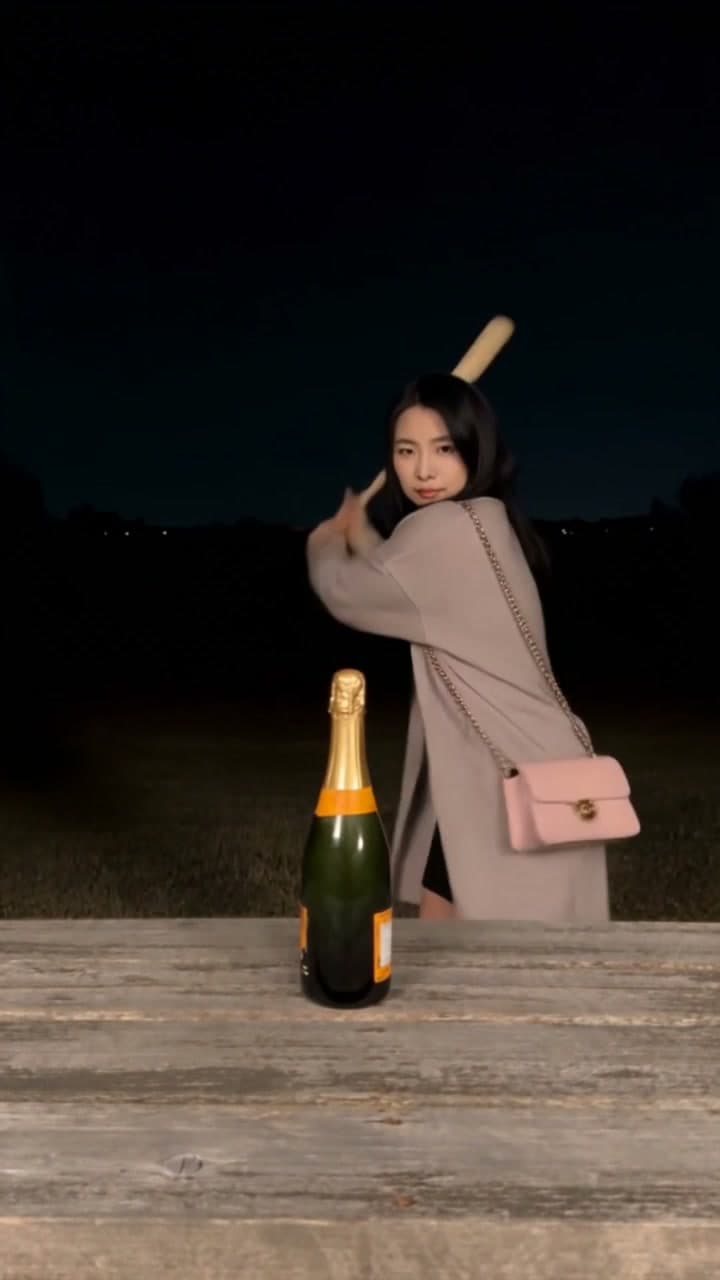
A Champagne Birthday AI TikTok can turn one portrait and a personal milestone into a short celebration post. This template uses the baseball-bat version: a person handles a champagne bottle beside a wooden table at night, followed by a black-and-white slow-motion spray finale. It creates a fixed 10-second, 720p, 9:16 video with original scene audio. Kling 3.0 Omni is the default at 200 credits; Wan 2.2 is optional at 125 credits.
Open the Champagne Birthday AI template to see which celebration scene your portrait will enter.
Make the milestone the reason to watch
The format suits a birthday greeting, an achievement diary or an account celebrating personal progress. Give the viewer a concrete reason for the celebration before the finale: “The project I nearly gave up on is finished” is more specific than “Big things coming.”
For a birthday, write the greeting in your TikTok caption or posting editor. For an ongoing account, save the scene for actual milestones so the celebration keeps its meaning. It can mark completing a course, finishing a creative project or reaching a follower milestone you have genuinely reached. The scene itself does not add custom birthday text or an age overlay.
Creator format brief
- Viewer trigger: A familiar person gets an exaggerated cinematic celebration for a real milestone.
- Series promise: Each celebration marks a specific step in the creator's longer journey.
- Opening line:
Celebrating [one milestone] because [why it mattered]. - Cover rule: Choose a clear face-and-table frame, with the milestone readable in the cover text.
- Comment prompt:
What small win are you celebrating this week? - Next episode: Return with a genuine progress update; use another celebration when there is a new milestone to mark.
Choose a portrait, then choose a model
Upload one authorised photo of one person. A visible face and upper body work well; a full-body image is not required. Choose a sharp, evenly lit portrait with no overlapping people or objects covering the face. The template supplies the bottle, bat, table and action, so no props, filming or source-video upload are needed.
Kling 3.0 Omni costs 200 credits per complete video and is selected by default. The public example is a Kling result. Wan 2.2 costs 125 credits per complete video. Both options produce the same fixed duration and output format, but the lower price does not mean identical likeness or clothing fidelity. Facial and clothing details can vary with either model; Wan is not a promise of a fully faithful copy of the public example.
Choose the model based on the displayed cost and your tolerance for variation. Review the face and outfit in your own result before posting rather than assuming the preview predicts the exact outcome.
Make your celebration post
- Sign in, upload one portrait and confirm permission to use it.
- Choose Kling or Wan. Check the fixed 10-second, 720p, 9:16 specification and selected total of 200 or 125 credits, including the fixed scene input.
- Confirm that your account has enough credits and generate. This template has no free generation preview.
- Watch the whole result with the original scene audio, checking the face, hands, bottle and final spray. Then add your milestone wording in your posting editor if desired.
This is the bat-smash scene, not the bench-tapping version of a champagne video. Keep the celebration as a generated scene; you do not need to recreate the bottle-and-bat action physically. Use TikTok's AI-content disclosure where required.
Connect this post to the next chapter
The ongoing account story can be the work behind the celebration. Follow a milestone clip with a short explanation of what you learned or what you are working toward next. When viewers mention their own wins, use the common themes to plan future posts rather than generating the same finale every day.
If viewers ask what you achieved, make the opening more concrete. If they share their own progress, respond with a relevant follow-up story. Watch time, comments and profile interest can guide experiments when available, but a celebration template does not guarantee views or followers.
Frequently asked questions
Does the template add my birthday age or custom greeting?
No custom age-overlay feature is offered here. Add your wording separately in the caption or posting editor; the template supplies the visual scene.
Which version of the trend is this?
It is the nighttime wooden-table scene with a baseball bat and a black-and-white spray finale. It is not the bottle-against-a-bench scene.
Will Wan look exactly like Kling?
No. Both use your portrait, but facial details, clothing and motion can differ. The public preview is a Kling example, not a comparison proving equal fidelity.
Is the sound included?
Yes. The download retains the corresponding scene's original audio, so adding replacement music is not a required step.
Where can I collect it later?
After the upload is confirmed, return to My videos in the original account. You can opt into completion email and confirm the address. Successful outputs are available for seven days after completion; follow the expiry shown with the result. Check pricing if you need more credits.
Choose your milestone and create the Champagne Birthday scene.
From your photo to a scene