Practical guide
How to make a Sega Dance Walk TikTok series
Use the orange-corridor walk as a repeatable TikTok confidence format, generated from one portrait without CapCut or a source video.
Built for a recurring account format
Creator format brief
Use this before generating so one post creates a clear next-post decision instead of another isolated clip.
- Viewer trigger
- A viewer sees a small personal victory that feels bigger than it is.
- Series promise
- Tiny wins get the same recognisable orange-corridor walk.
- Opening line
- The walk I do after [tiny victory].
- Cover rule
- Keep the face and orange corridor readable before the viewer opens the post.
- Comment prompt
- What tiny win deserves the next walk?
- Next episode
- Use suggested wins to make batches for the next week while keeping the visual signature.
In this guide
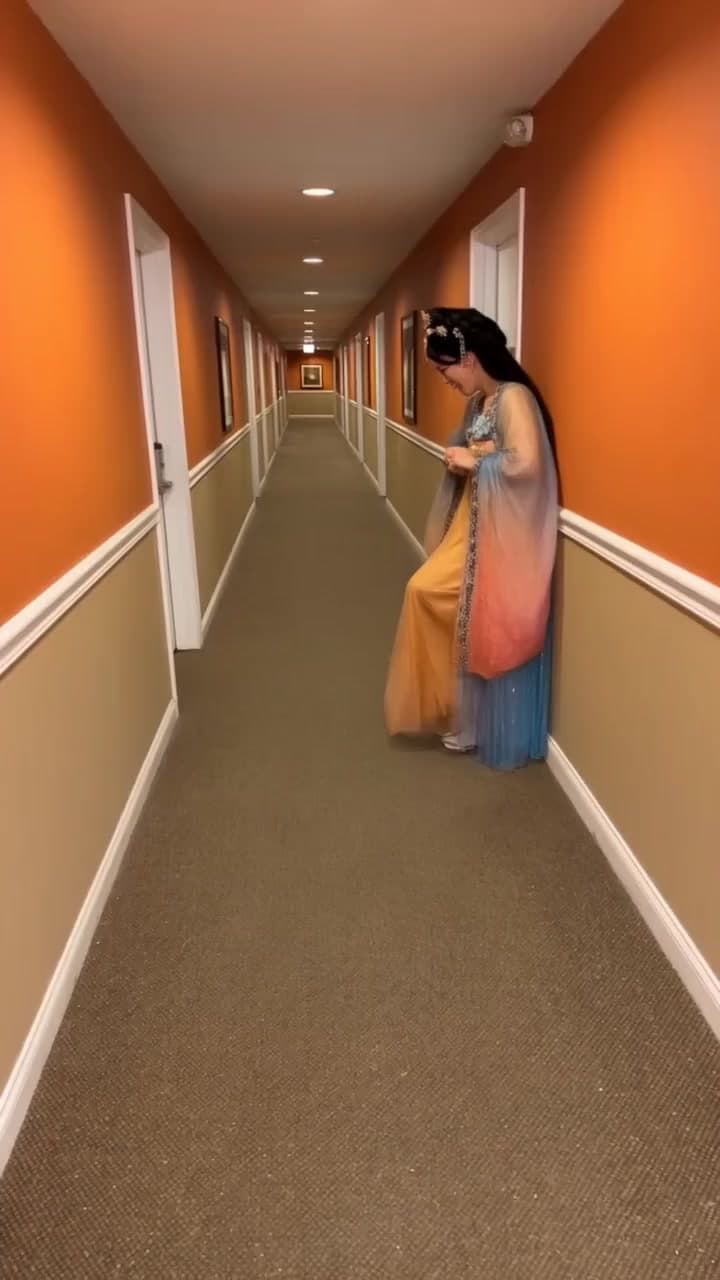
The Sega Dance Walk AI template makes the orange-corridor version of the walking-dance video, with one performer moving toward the camera. For a TikTok creator, it is a repeatable “small win, big walk” format: keep the orange corridor as the visual signature and change the reason for the walk in each episode. Upload one clear portrait. AI Video Swap supplies the corridor and motion, so you do not need CapCut, a hallway image, a full-body photo or a source video. The supplied notes describe 7- and 10-second options, with 10 seconds as the first choice.
Is this the version I mean?
Use this page for the orange hallway and forward walk. “Sega dance” is also used as a tutorial label for other edits, so a different clip or sound may have different requirements. The exact original uploader and soundtrack of this corridor scene were not independently confirmed.
What you need
- One single-subject portrait with a visible face.
- Permission to use the person's likeness.
- No full-body photo, hallway image, dance recording or CapCut project.
The motion reference supplies the walk. Clothing details, feet and face consistency can still change during generation, so review the result rather than assuming a portrait will preserve every detail.
How to make it
- Open the Sega Dance Walk template and confirm that its orange-corridor preview matches the format you want.
- Upload one clear portrait. A normal portrait is enough; do not crop away the face to imitate the distant opening pose.
- Choose the 10-second option first. The supplied lab note lists 200 credits at 20 credits per second; confirm the current total and duration on the live page.
- Watch the approach, foot movement, corridor edges and final beat at normal speed.
The current template guidance in the supplied materials limits this scene to 7 or 10 seconds. Do not promise a 15-second version unless the live page changes and is reviewed. Full generation requires sign-in and sufficient credits.
Turn it into a repeatable TikTok series
The series promise can be: “The walk I do after a tiny victory.” It is simple enough to understand from a cover, broad enough to update often and specific enough that viewers can suggest their own versions.
Rotate through three types of premise:
- Everyday wins, such as sending a difficult message or finishing a small task.
- Niche-community wins, such as a hobby milestone or an inside joke your audience recognises.
- Comment-led follow-ups, where a viewer supplies the next tiny victory.
Put the specific victory in the first line of text, keep the cover on the face and orange corridor, and use a short caption that asks for the next situation. The scene is the consistent packaging; the premise is the reason to watch another episode.
Use each post as an operating brief
Before generating, choose the audience situation, opening line, cover frame and comment question. After posting, record which wording earns scenario suggestions and which only receives generic praise. Use those suggestions to set the next week's batch, while varying the premise so the account stays recognisable without becoming repetitive.
What to check before publishing
Inspect the frame where the subject approaches the camera. Face drift, unstable feet or a clipped corridor edge can appear only during movement. Choose a clean frame for the cover and describe the result as an AI-generated scene. A CapCut edit can be an optional finishing step, but it is not an input requirement here.
Use the destination platform's AI-content disclosure for a realistic likeness and confirm photo permission before sharing.
Frequently asked questions
Do I need CapCut?
No. The template creates the corridor and movement. CapCut is optional for later editing.
Do I need a hallway photo or walking video?
No. Upload one portrait; the scene and motion are supplied.
Can I generate 15 seconds?
The supplied template notes describe 7 and 10 seconds. Check the live controls rather than assuming a longer option exists.
What song is used?
The exact soundtrack was not independently confirmed in the supplied research. Name only what you can verify in the finished video.
Is one template enough to grow a TikTok account?
No single template guarantees growth. A repeatable scene can become a useful account format when every post has a new relatable premise, clear cover and a reason for viewers to suggest the next episode.
Make the scene from the Sega Dance Walk template.
From your photo to a scene