Practical guide
How to Make a Crowd Walk AI Video From One Photo
See whether the Crowd Walk celebrity entrance suits you, generate it from one adult photo for 350 site credits, then review, caption and share the result.
In this guide
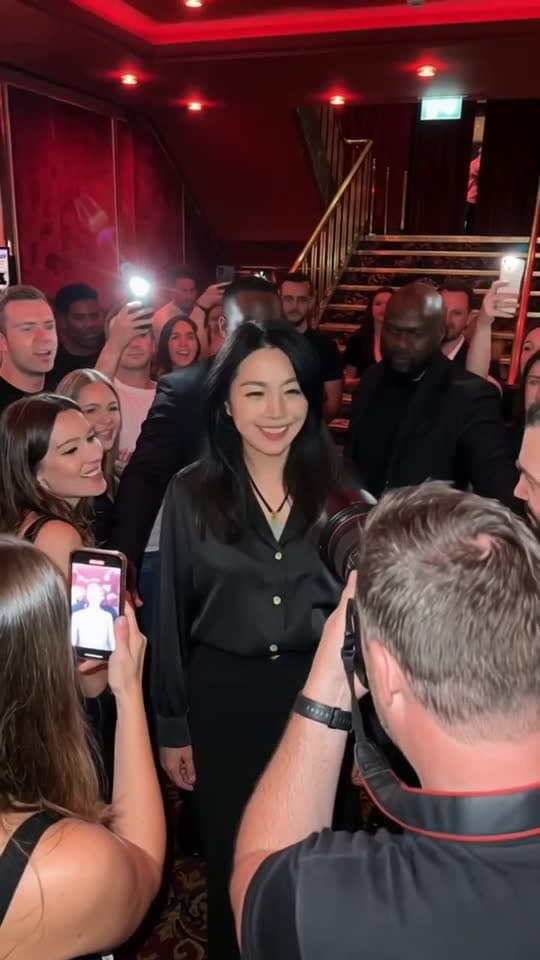
The doors open onto a red foyer. Fans lift their phones, a photographer steps in close, security staff keep the path clear, and one person walks through it all as if this happens every Friday. That is the appeal of Crowd Walk AI: an ordinary arrival gets the entrance usually reserved for someone famous.
If you want that celebrity entrance AI video with your own face, start on the Crowd Walk template. The prepared scene supplies the walk, the crowd and the soundtrack; one adult photo supplies the appearance. You do not have to film a walking through fans video yourself. One complete video costs 350 site credits. Watch the sample first — it runs for about 15 seconds and includes the original soundtrack from the source scene, restored onto the sample — then check the output details shown on that page before you generate.
Is this celebrity entrance right for you?
This is a specific club-foyer walk, not a general editor for every famous arrival. Watch the full sample and decide whether this is the joke you want to tell.
The lead walks towards the camera through a red club foyer, with a staircase at the back. Fans hold up phones, some with their flashes firing. A photographer shoots from very close range, and security staff stand beside the path. The lead pauses, points, raises a hand, then turns towards the stairs. The handheld camera makes it feel like backstage footage rather than a polished advert. If you want a paparazzi AI video with that close, slightly chaotic energy, this is the shape of it.
It is not a premiere red carpet AI video, with a long carpet and photographers behind a barrier. Crowd Walk is closer to a nightclub entrance video or a VIP entrance video in a club foyer: the crowd is close enough to touch, and the staircase suggests the party is upstairs. The lighting is a deep red, which is why some people describe similar clips as a red light club edit.
Only the adult lead is meant to change. Your photo guides that person's face, hair and a natural sense of age and build. Fans, people holding phones, the photographer, security staff and the people on the stairs stay as they are. The scene is designed to keep the original background, so the foyer, staircase and lighting stay those of the prepared scene. If you want a friend to appear as the photographer, this is not the right template. It is not a face swap crowd video in which everyone in the foyer changes; only the lead is replaced.
Do not choose Crowd Walk expecting the clothes from your photo to be kept, and do not count on the grey suit from the source scene either. In the public sample the lead wears the clothes from the official model photo. Treat the outfit as part of the effect, not as a promise.
The preview on the template page is a single sample made on AI Video Swap from our official model photo. It is not a real celebrity appearance, and it is not a guarantee of how every new photo will look. The scene is based on the Crowd walk variant on MakeViral's Pimpwalk Entrance trend page, labelled new on 10 November 2026. That page says its sample lead was made from a photo of an AI-generated man, not a real celebrity. We do not reproduce that source clip here.
Choose one adult photo
Crowd Walk is a one photo AI video: no second portrait, no reference video of your own and no filming. Going from a photo to celebrity video places a lot of weight on that one image, so pick it carefully.
- Use one adult, from the chest or waist up.
- Keep the eyes, hairline and some of the side of the face visible.
- Prefer even light to deep shadows or strong beauty filters.
- Avoid group photos, large sunglasses, hats that hide the hairline and hands across the face.
- Use your own photo, or one of another adult who has given you permission.
Use JPEG, PNG or WebP, up to 10 MB per photo. Convert iPhone HEIC photos to JPEG first. Children and pets are not supported.
This is not a suit transformation video that tailors your own clothing. Your photo supplies the person; the scene may supply a different outfit.
How to make the video
- Watch the sample with sound on the Crowd Walk template. Confirm that this foyer walk is the entrance you want, and read the output details shown on that page.
- Choose one adult photo using the checklist above, and confirm you have permission to use it.
- Sign in to the account you will use to collect the result. Browsing the sample is public; generating requires a signed-in account so the job and any credit charge can be associated with you.
- Check the complete-video price. One Crowd Walk video costs 350 site credits. Confirm the quote on the template page before you submit. Watching the sample is free; this template is not offered as a free generated version.
- Generate once, then follow the job in My videos in the same account. Closing the tab is not a reason to press Generate again. If you are unsure whether the request was accepted, check the task list first.
- Review the whole clip before sharing. Watch the flashes, the camera passing the face, the head turns, the point, the raised hand and the final turn to the stairs. Listen for the audio, too.
The template controls the generation instructions, so you do not have to write a Crowd Walk prompt. It does not offer custom choreography, a different song or a second replaceable role.
What it costs, and how payment works
One complete Crowd Walk video costs 350 site credits, including the prepared scene. Site credits are not US dollars. Confirm the amount shown beside Generate on the template page; that on-page quote is the figure to trust at the moment you submit.
For context, the current Acquisition plan is US$4.99 per month for 499 credits. At 350 credits per video, that covers one Crowd Walk video with 149 credits left. A second video needs another 201 credits. It is a recurring subscription, not a one-time US$4.99 purchase of this clip. Credits granted by an active or previously paid plan do not expire under the current terms. Cancel future renewals through Stripe's customer billing tools. See the current plans before you subscribe. If you already have 350 credits, you do not need another plan just for this video.
A failed paid job returns its site credits automatically. A successfully completed video whose creative details you dislike is a different situation, and is not covered by that automatic credit return. Check the job status in My videos before sending another request; a “Credits returned” label confirms a credit return. This is a site-credit policy, not a promise of an automatic cash refund. For billing questions, see the payment terms or email lina@aivideoswap.com with your receipt.
Find the result, then check it
When generation succeeds, the video is delivered to My videos in the original account. It is not automatically added to the public gallery. Generated results are available for seven days after completion; download a copy before the expiry shown with your result. You can also enable an optional completion notification and confirm its email address. Video and face uploads are deleted within 24 hours.
The difficult moments for likeness are predictable, so watch them on purpose:
- Phone flashes briefly wash out skin tone and detail — that camera flash effect is part of the paparazzi effect, but it can also hide identity for a few frames.
- A camera passes in front of the face, hiding it momentarily.
- Quick head turns show the profile, which a front-facing selfie may not describe.
- The point and raised hand bring fingers close to the face.
- The final turn towards the staircase shows the back of the head.
A common question is how to keep my face consistent through those moments. Start with a photo that shows some of the side of your face and your real hairline; that gives the model more to work with. Nothing can guarantee likeness in every frame, so review the whole clip, not just the first second. The unchanged crowd is doing useful work here: their phones and reactions tell viewers the lead matters. Your photo provides the person; the scene provides the attention.
The public sample is an AI video with original sound. For a video you generate, check the audio handling shown on the template page, then listen to your own result. If a browser starts silently, tap play and check both the player volume and your phone's volume. That is different from a downloaded file missing its audio track. The included source audio is not a commercial music licence; check rights separately before using a clip in advertising.
Captions, posting and a series you can repeat
The entrance is the joke; the caption explains why it is happening. “Make me look famous” works best when the reason is gloriously ordinary. Add captions in your usual editor after downloading. The scene does not insert text or change dialogue for you.
- “Me arriving at the office after replying to one email.”
- “Walking into the group chat after being right.”
- “When the barista remembers my order.”
Keep the text away from the eyes and from the app's on-screen controls, and choose a cover frame where the face is clear of flashes and cameras. Follow each platform's current AI-labelling and content rules if you post the clip as a TikTok, Reel or YouTube Short. A recognisable scene and a finished generation do not guarantee views.
Creator format brief
- Viewer trigger: someone viewers know receives a full celebrity entrance for something completely ordinary.
- Series promise: the same red-foyer arrival each time, with a new small achievement as the excuse.
- Opening line: “Me arriving after [one tiny achievement].”
- Cover rule: choose a frame where the face is clear of flashes and cameras, and keep a short caption away from the eyes.
- Comment prompt: “Who in your group deserves this entrance, and for what?”
- Next episode: turn one specific reply into the next caption, using a photo of an adult who has agreed to appear.
Reuse a downloaded clip with a new caption when only the joke changes. You do not need to pay for another generation just to change your post text.
A small story to try: the booking confirmation entrance
The scene already gives you a celebrity walking through crowd. Give that walk a reason before you spend another 350 credits. One that needs little explanation is a family booking: you were the person who finally reserved the restaurant for a birthday dinner, and the clip treats that confirmation as a red-carpet moment.
The mismatch is the joke, so keep the caption specific and leave the face unobstructed. If you want help planning the post rather than another render, try requests such as:
- “Write three short captions that treat booking a family restaurant as a celebrity entrance, without sounding like an official event.”
- “Give me a checklist for reviewing likeness through flashes, a close camera and a turn towards the stairs.”
These are planning prompts you can use in any writing tool, not extra controls in the template and not measured search queries. A clearer caption can often fix an unclear premise without generating the scene again.
Practical questions before you create
These answers follow the current AI Video Swap payment and delivery terms. They are written around likely reader questions, not measured search volume or rankings.
Can I make the Crowd Walk video with my own photo?
Yes. Open the Crowd Walk template, upload one adult photo and confirm the 350-credit quote. Output length and frame size for a generated video are shown on that page before you submit.
Who changes in the scene?
Only the adult lead walking through the foyer. The template is designed to replace only the main person and keep the original background. Fans, photographers and security staff stay as they are.
Is the person in the sample a real celebrity?
No. The person in the public sample is our official model, shown as a single example of the scene, not a real celebrity appearance. According to the source page, its own sample was made from a photo of an AI-generated man. We do not reproduce that source clip.
Will my own clothes be kept?
Do not count on it. In this sample the lead wears the clothes from the model photo rather than the grey suit from the source scene. That is not a promise that either look will be kept for your photo.
How long will the video be, and will it have sound?
Check the output details on the Crowd Walk template before you submit. The public sample is about 15 seconds and includes the original soundtrack from the source scene, restored onto the sample. That is the sample you can watch, not a locked specification for every generated video.
What will it cost, and what happens if a job fails?
One Crowd Walk video costs 350 site credits. Watching the sample is free; we are not promising a free generated version. Confirm the quote on the template page before you submit. A failed paid job returns its site credits; a completed result you dislike does not receive that automatic return. See the payment terms for billing questions.
Which photo format should I use, and can I do this on my phone?
Use JPEG, PNG or WebP, up to 10 MB, in a mobile browser or on a computer. Convert HEIC to JPEG first. Sign in with the same account you will use to collect the result.
Where do I find the finished video, and how long is it kept?
Open My videos in the original account. Successful results are private and should be downloaded within seven days. They are not automatically added to the public gallery.
Is there a Crowd Walk CapCut template, or should I write my own prompt?
You may find something called a Crowd Walk CapCut template. That is a separate product: AI Video Swap is not affiliated with CapCut or with the reference's source site, and a similarly named template may use a different clip or rules. If you want this prepared foyer walk, use the AI celebrity walk template rather than a general prompt.
For help choosing between scenes, read how to choose an AI video trend without wasting credits.
Ready to make your entrance?
Pick the photo and decide who deserves the red-foyer treatment, then open the Crowd Walk template to watch the sample, confirm the 350-credit price and generate.
From your photo to a scene