Practical guide
Hotel Lobby AI Rap Video: Photo Order, Framing and Credits
Create a two-person Hotel Lobby AI rap video. Prepare left and right portraits, review the duration quote and keep both performers visible when editing.
Built for a recurring account format
Creator format brief
Use this before generating so one post creates a clear next-post decision instead of another isolated clip.
- Viewer trigger
- A viewer immediately recognises a duo they would tag or compare.
- Series promise
- Unexpected pairs enter the same orange performance scene, with a new familiar situation each time.
- Opening line
- When [two roles] have to handle [one familiar situation].
- Cover rule
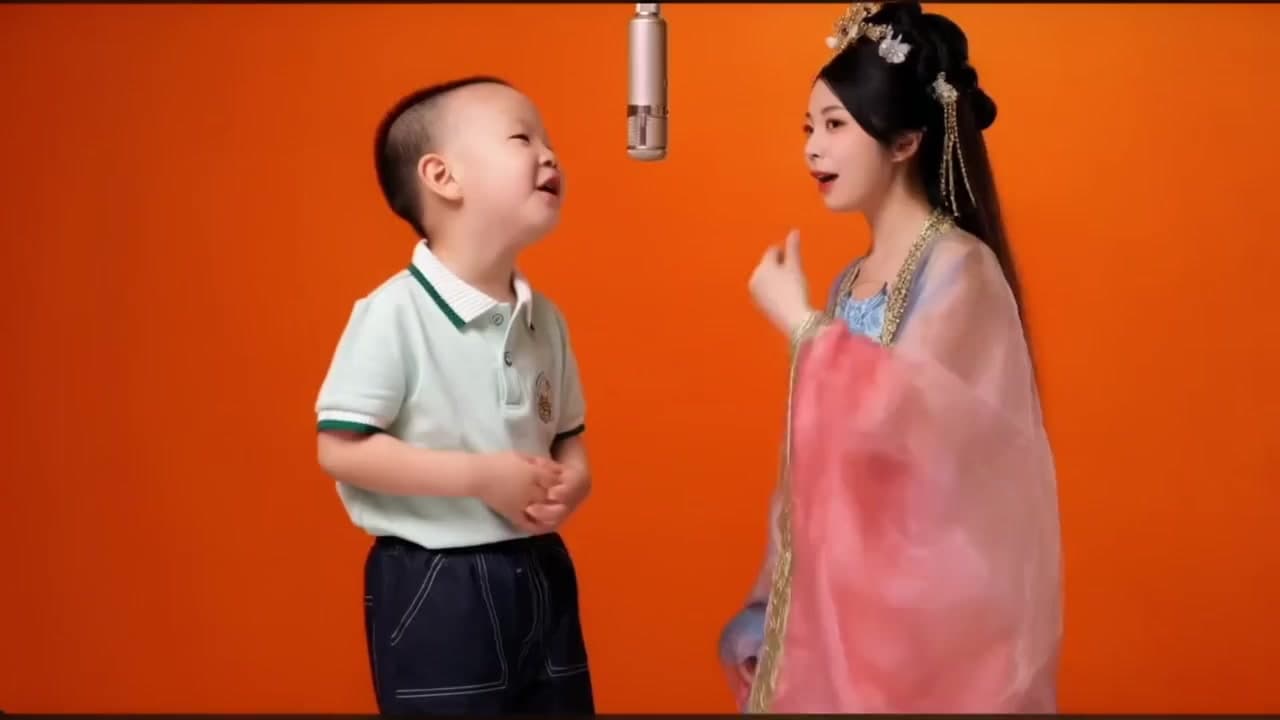
- Keep both faces and the hanging microphone visible in the same frame.
- Comment prompt
- Who should be the next unlikely duo?
- Next episode
- Turn the clearest suggested pairing into the next episode, then change the situation.
In this guide
A Hotel Lobby AI rap video puts two people in the prepared orange performance scene beneath a hanging microphone. Use two separate portraits: first photo for the left performer, second photo for the right. You do not need a hotel photo, a recorded rap or a source video.
The most useful preparation is deciding who occupies each role and choosing clear photos. For the scene format and recurring post ideas, see the Hotel Lobby guide.
Decide the left and right roles first
Imagine the finished frame from the viewer's perspective. Assign one person to the left and the other to the right, then match the upload labels. Write the order down if you are making several versions with different pairs.
Use one face per file. A group selfie may leave the intended identity ambiguous, especially when faces overlap. If you crop an existing photograph, keep the entire face visible and confirm that the remaining image is still sharp enough to inspect.
The template supplies the microphone and orange setting. A plain portrait is more useful than a busy image chosen only because its background looks musical. Both people should agree to the likeness edit.
Match photo quality without forcing identical poses
Look for even light and a visible face in each portrait. Avoid one heavily filtered image paired with one natural photograph. Similar image quality helps you evaluate the result fairly, even though the two people need not wear matching clothes or stand in identical poses.
Check glasses, hair across the eyes and hands near the mouth. The source scene already contains performance movement; there is no advantage in introducing avoidable facial obstruction in the input.
Two photos describe two identities. They do not let you direct every gesture or make the performers sing new words. This template uses the prepared scene and its sound, not a custom rap composition.
Review duration and credits together
Open the Hotel Lobby template and inspect the duration control and total before submitting. The current standard rate is 20 credits per second; the 7-second option is 140 credits. Other available lengths change the total. The number beside Generate is the quote for your selected option.
An eligible signed-in customer may have one 3-second, 480p watermarked preview before their first successful purchase. Hotel Lobby is an eligible template, but the account must still have that single allowance available. There is no new free allowance after buying a plan or for each additional template.
If you want a full video, check Pricing against the credit total rather than assuming a subscription includes a fixed number of videos. Different templates can cost different amounts.
Follow the task through to download
- Sign in, confirm the two photos and their role order, and choose the available duration.
- Review the credit total, confirm permission and submit once.
- When the task is accepted, open My videos to follow progress.
- Watch the successful result and download it before the expiry shown on the record.
If a task is still processing, inspect that record before creating another. If it fails, check its error and refund status. Do not treat a slow page or an uncertain submission as proof that no task exists.
Keep both faces in the social edit
Watch the original composition before making a tighter crop. A portrait-format post can still cut off a performer if you zoom too far. Choose a cover where both faces and the microphone are readable, and place the caption above or below the faces.
A useful caption gives the duo one shared situation: “The two people left to finish the group project” is a clearer premise than a long explanation of the software. Keep it fictional and avoid implying a real endorsement or performance.
Check sound on your phone as well as on speakers. The generated scene is not a licence for unrelated music; review the destination platform's music and AI-disclosure rules before sharing.
What if the people are on the wrong sides?
For the next generation, correct the input order. Merely changing the downloaded filename does not change the video. Check the two upload thumbnails before paying for another attempt.
If you prefer one lead performer instead of a duo, the Bulin47 photo guide explains a different contract: three views of one adult, not two identities.
Check Hotel Lobby left and right photos
The Hotel Lobby photo order is a casting decision: the first portrait becomes the left performer, the second the right performer. For this two portrait rap video, prepare each face separately and compare both thumbnails with the uploader labels. A single group photograph makes that assignment harder to inspect.
Review Hotel Lobby video credits alongside the selected duration before generating. The current full-video rate is 20 credits per second; the account-specific trial, where eligible, is a separate offer. This AI face swap supplies the prepared performance, so spending more credits does not buy custom lyrics or a newly recorded voice.
From your photo to a scene