Practical guide
Burning Bridges AI Video: One Photo, Original Sound and Captions
Make a Burning Bridges AI face swap from one portrait. Check the square format, hand-over-face moments, original audio and 200-credit generation price.
In this guide
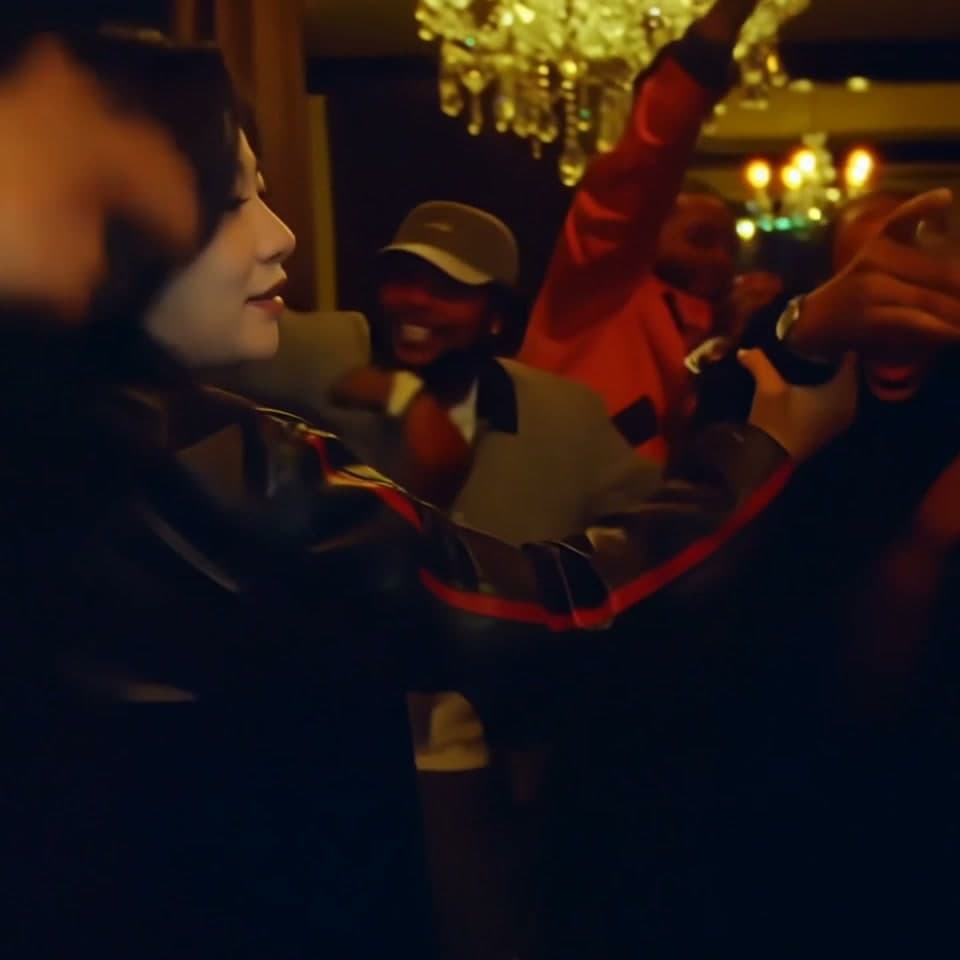
The Burning Bridges AI video template turns one clear portrait into the lead performer in a prepared party scene. It creates a 10-second square video with original scene sound for 200 site credits. The hand-over-face reveals belong to the scene; you do not need to pose with your hand covering your face in the input.
This guide explains photo preparation, generation and editing. It does not claim that the person in your result performed in the original video or that the template writes a new song.
Start with an unobstructed portrait
Use one image with one clearly visible face, even lighting and no heavy filter. A front-facing portrait is a useful starting point. Avoid sunglasses, motion blur and a hand across the mouth or eyes.
That last point matters here: the performance already includes hands crossing the face. A clean input gives the system a clearer identity reference for the moments when the face is revealed. It cannot eliminate every possible artefact, so plan to inspect those transitions in the result.
You do not need to upload the party background, other guests or a performance recording. This is a single lead role, not a multi-person replacement tool. Use a portrait you have permission to edit.
Check that this is the scene you want
Open the Burning Bridges template and play the full example with sound. Check the framing and the reveal moments, not only the cover image. The sample demonstrates the prepared scene; results from another portrait may vary.
The output is square. If your destination is a vertical TikTok or Short, decide whether to keep the whole square frame on a vertical canvas or crop it. A tight crop can remove the hands or part of the head at the moment that makes the scene recognisable.
Confirm the price before generating
The current full video costs 200 site credits and has no free preview. Signing up does not create a free allowance for this template. The separate one-time trial is limited to eligible templates and must be used before the customer's first successful purchase.
- Sign in on the template page and upload the portrait.
- Check the input thumbnail, permission box and total beside Generate.
- Submit once and follow the accepted task in My videos.
- Open the successful result, listen to it and download it before the displayed expiry.
If you need more credits, follow Pricing, then return in the same browser and account. Check the saved draft before submitting. Do not repeatedly generate while a previous request is still pending.
Inspect each reveal before posting
Watch the clip from beginning to end at normal speed. Then revisit the hand-over-face transitions: does the person remain recognisable when the hand moves away, and do the eyes and mouth stay coherent? Check the final moment as well, so an awkward ending does not surprise you after export.
Listen for the original scene sound. This workflow does not clone your voice, change lyrics or compose a soundtrack. Do not describe the result as a new song performed by the uploaded person.
If the task failed, inspect the error and refund status. A completed video that differs from your artistic expectations is a different outcome from a generation failure.
Give the caption one clear premise
A short fictional situation is easier to understand than a list of trending names. For example, “Me leaving the group chat after volunteering for everything” gives the performance a recognisable joke without making a claim about a real conflict.
Keep cover text away from the face and hands. On a vertical canvas, use the spare space for a brief caption instead of zooming until the original composition is lost. Compare the finished post on a phone before publishing.
Use the destination platform's AI-content labels where appropriate, and check music permissions for the way you intend to share. A generated likeness edit does not transfer rights to a song or imply the original performer's endorsement.
For a vertical street freestyle instead, see the Bulin47 photo guide. For choreography supplied by a different scene, compare the AI dance templates.
Keep the Burning Bridges square video intact
The Burning Bridges photo template is an AI face swap for one lead performer. The portrait identifies that person; it does not replace the party, other guests or the prepared gestures. Choose a photo with an unobstructed face so the hand-over-face moments have a clear identity reference.
A Burning Bridges square video can sit inside a vertical canvas without cutting away the hands. Listen to the Burning Bridges original sound before adding captions, then keep the reveal area clear. The generated scene includes its existing audio; it does not turn the uploaded person into a newly recorded singer.
Practical questions before you create
These answers cover the current AI Video Swap workflow. They are written around likely customer questions, not a measured ChatGPT popularity ranking.
Choosing this scene
What is the Burning Bridges AI video trend?
This page covers the hand-over-face party reveal scene. One-person replacement in the Burning Bridges party scene, including hand-over-face gestures and reveals, with the original scene sound. Facial and hand details can vary. The prepared scene is the reference for this template, rather than a promise to reproduce any video found under the same trend name.
How do I make a Burning Bridges video from photos?
Open the Burning Bridges template, watch the preview, sign in and prepare the requested images. Upload one clear portrait of the person you want in the lead role, with their permission. Use a visible face, even lighting and no heavy filters. Review the displayed quote and confirm once.
Is Burning Bridges a face swap or a new video from a text prompt?
It is a prepared-scene workflow: your images guide the replacement within the hand-over-face party reveal. It is not an unrestricted text-to-video brief. A caption describing a different setting does not change the template scene.
Can ChatGPT generate my Burning Bridges template video for me?
You can ask ChatGPT to help plan a caption, compare inputs or explain a scene. That conversation does not submit a job on AI Video Swap, reserve credits or create a result in your account. Complete those actions on the template page.
Preparing the right inputs
How many photos does Burning Bridges need?
Upload one clear portrait of the person you want in the lead role, with their permission. Use a visible face, even lighting and no heavy filters.
Which person will my photo replace in Burning Bridges?
Upload one clear portrait of the person you want in the lead role, with their permission. Use a visible face, even lighting and no heavy filters. Compare the labelled upload slots with the preview before proceeding. Do not infer an extra replaceable role just because somebody else appears in the background.
What makes a good reference photo for Burning Bridges?
Use even lighting and a recognisable, unobstructed face. For this scene, follow the specific framing requirement: Upload one clear portrait of the person you want in the lead role, with their permission. Use a visible face, even lighting and no heavy filters. Avoid improving a blurry reference by adding a strong beauty filter; that can remove useful identity detail.
Can I use a group selfie for Burning Bridges?
Use separate, clearly identified photo inputs rather than relying on the tool to choose one face from a crowded image. Crop only when it preserves the required face and body framing; if the intended person is too small, take another photograph.
Understanding the output
Do I need to film the Burning Bridges dance or performance?
No source performance upload is needed for this prepared template. The hand-over-face party reveal is already supplied. Your task is to provide the correct photos, check the chosen option and review the generated result.
Can I change the background or choreography in Burning Bridges?
The hand-over-face party reveal and its action define this template. It is not a menu of arbitrary choreography or locations. Choose another scene for a different visual idea; a different photo alone is not a reliable way to request a new script.
Can Burning Bridges keep my exact outfit and accessories?
Exact clothing, accessories and likeness are not guaranteed. Inspect the face disappearing behind the hand and returning. A clear reference can help the model, but it does not turn the result into a pixel-for-pixel reproduction of your photo.
Can I use a pet instead of a person in Burning Bridges?
This is a human-photo template; a pet workflow is not claimed. A popular animal dance seen on TikTok does not establish pet support in this form. Use an explicitly supported workflow rather than spending credits on a mismatched input.
Cost, trial and account
How long is a Burning Bridges video?
The current listed range is 10 seconds. The public sample and the chosen output option can have different lengths, so use the form’s selected duration for the purchase decision. Do not substitute a duration from another website’s tutorial.
How many credits does Burning Bridges cost?
The current contract uses 200 credits for the listed full-video option. The confirmation shown immediately before Generate is the amount to check. Site credits are not US dollars, and another provider’s unit price is not the price of this template.
Can I try Burning Bridges for free?
This template does not offer the free preview. Eligible customers who have not made their first successful purchase can check the marked trial templates; the allowance is once across the site, not once per template.
Why does Burning Bridges ask me to sign in before uploading?
Browsing the hand-over-face party reveal preview is public. Uploading and generation require a signed-in account so the job and any credit charge can be associated with you. Use the same account to find the result later.
Generation and delivery
What happens if I do not have enough credits for Burning Bridges?
Use the upgrade or Pricing link from your chosen scene and compare the plan’s credits with the displayed job total. Return to the intended template after checkout, verify the balance and photo slots, then confirm generation. Buying a plan is not itself a video submission.
Why has my Burning Bridges video not appeared immediately?
Video generation is asynchronous. Check the existing job in My videos and distinguish queued, running, failed and succeeded states. Slow output is not a reason to repeatedly press Generate; first establish whether a job was already accepted.
Where can I watch or download my Burning Bridges result?
Open My videos in the same account, select the job and use its result controls when it succeeds. Download a copy while it remains available; the video area is a temporary delivery surface, not a permanent media archive.
What should I check before sharing a Burning Bridges result?
Watch the whole clip at normal speed, then pause around the face disappearing behind the hand and returning. Check the first and last frames, framing and audio too. A good cover image alone does not establish that every frame is suitable to share.
Reviewing and sharing
What should I do if Burning Bridges fails or the result looks wrong?
Record the job ID and displayed status. A terminal failure and an unattractive successful result are different issues. Check the credit transaction history before resubmitting; ask support about an unresolved charge rather than assuming a quality complaint creates an automatic refund.
What caption could I use for a Burning Bridges TikTok?
Try the premise “me pretending I have not seen the group chat”. Make the opening text understandable before the action peaks. Place it away from the face and the app controls, then preview on a phone. Treat this as a creative suggestion, not a proven viral caption.
Can I post my Burning Bridges video to TikTok, Shorts or Reels?
Check the framing, export and platform rules first. A video file containing music is not evidence of a music licence for every platform, region or advertisement. Obtain the permissions you need and avoid presenting an AI scene as documentary footage.
Is Burning Bridges guaranteed to be trending or get views?
No. Search interest, a recognisable scene and a completed generation do not guarantee reach. Compare your own posts using retention, qualified visits and conversions. The questions in this guide are editorial predictions of customer needs, not access to private ChatGPT search statistics.
A small story to try: A reveal for the friend with an exit speech
The scene gives you a party performance with hand-over-face gestures. Give that existing action a reason to happen before asking for another render: a recognisable everyday situation often needs less explanation than a generic “viral AI video” caption. Keep the premise consistent with the actual preview and leave the face and important movement unobstructed.
For a more useful ChatGPT planning conversation, try these specific requests:
- “Write four Burning Bridges captions about leaving a bad habit behind, without targeting a real person.”
- “Help me choose a clear portrait for a scene where a hand repeatedly covers the face.”
- “Build a frame-review checklist around every face reveal, not just the opening.”
These are suggested customer planning prompts, not measured ChatGPT searches or extra controls in the template. Use the first to develop the joke, the second to prepare the inputs and the third to review the result before sharing. A caption edit can improve an unclear premise without paying to generate the same scene again.
From your photo to a scene